Free quotes from your phone.
Fill in a professional quote on site, save it as a PDF and send it to your customer. No sign-up, no subscription, no catch.
Works on iPhone, Android, tablets and computers.
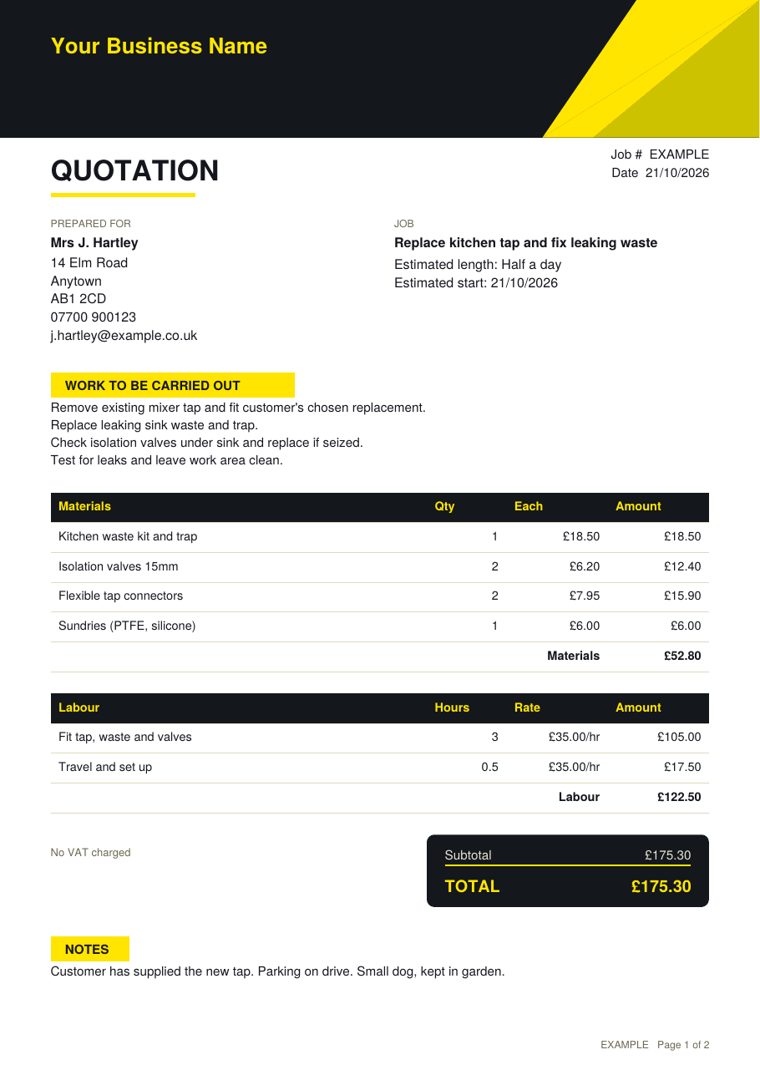
On site to sent in three steps
It follows the same layout as a paper estimate book, so there is nothing new to learn.
Fill it in on site
Customer details, the job, materials and labour. Totals add up as you type, VAT included if you need it.
Sketch the job
Draw the room, pipe run or measurements with your finger. The diagram goes on the quote.
Save as PDF
One tap gives you a smart PDF with your name and logo on it, ready to send, print or keep.
Everything you need, free
This is not a trial. All of this is free for as long as you want to use it.
Professional PDF quotes
Your business details, logo and terms on every quote, with a signature line for the customer.
Full job sheet
A second PDF for your own records with the appointment, contact method and your notes.
Materials and labour
Add as many lines as you like. Quantities, hourly rates and totals worked out for you.
VAT at the tap of a box
Add VAT at 20% or your own rate. Your VAT number prints on the quote.
Finger-drawn diagrams
Three pen colours, undo and clear. Handy for layouts and measurements.
Saved quotes
Search past quotes, mark them sent, accepted or declined, and copy one to start a new job.
Automatic job numbers
Every quote gets the next number in your sequence, with your own prefix.
Backup file
Download all your quotes as one file and restore them on a new phone.
Made for people who quote in person
If you visit homes or business premises to price up work, Estimate Book fits the way you already work.
- Plumbers
- Electricians
- Builders
- Heating engineers
- Painters and decorators
- Carpenters and joiners
- Roofers
- Plasterers
- Tilers
- Kitchen and bathroom fitters
- Handymen
- Landscapers and gardeners
- Flooring fitters
- Window cleaners
- Locksmiths
- Cleaners
Keep it on your home screen
Add Estimate Book to your home screen and it opens like any other app, full screen, and works on site with no signal.
iPhone and iPad
- Open this page in Safari.
- Tap the Share button (the square with an arrow).
- Scroll down and tap Add to Home Screen.
- Tap Add. Look for the yellow spanner icon.
Android
- Open this page in Chrome.
- Tap the ⋮ menu at the top right.
- Tap Add to home screen or Install app.
- Tap Install to confirm.
Free stays free. Pro is there if you want more.
Most people will never need to pay. If you start doing lots of quotes and want them kept safely online, Estimate Book Pro adds the extras.
| Feature | Free | Pro |
|---|---|---|
| Unlimited quotes and PDFs | Yes | Yes |
| Logo, VAT and your terms | Yes | Yes |
| Works with no signal | Yes | Yes |
| Quotes kept online, safe if you lose your phone | No | Yes |
| Same quotes on phone, tablet and computer | No | Yes |
| Send by WhatsApp, text or email | No | Yes |
| Customer taps to accept the quote | No | Yes |
| Turn a quote into an invoice | No | Yes |
Estimate Book Pro
- Log in and find any old job in seconds
- Send a quote link by WhatsApp, text or email
- Get told when the customer accepts
- One tap from quote to invoice
- Your free quotes move across when you upgrade
Common questions
Is Estimate Book really free?
Yes. Writing quotes, saving them on your phone and creating PDFs is free with no time limit. A paid upgrade is planned for people who want their quotes stored online, but you never need it.
Do I need to create an account?
No. Open the page and start writing a quote. There is no sign-up and no email address needed.
Where are my quotes kept?
In the free version your quotes stay on your own phone or tablet. Nothing is sent to us. You can download a backup file whenever you like, which is a good idea before changing phones.
Does it work without a phone signal?
Yes. Once you have added it to your home screen and opened it once, it works on site with no signal.
Can I put my logo and VAT number on quotes?
Yes. Add your business name, phone, logo, VAT number and terms once and they appear on every PDF.
Does it work on iPhone and Android?
Yes. It runs in the web browser on iPhone, iPad, Android phones and tablets, and computers. Nothing to download from an app store.